


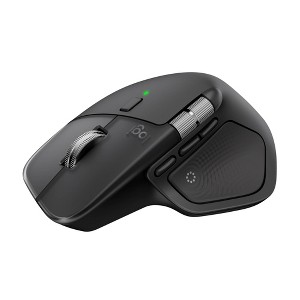
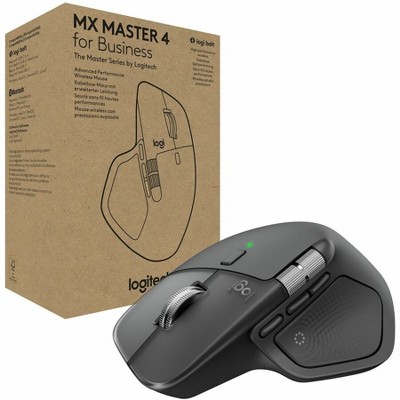
Logitech MX Master 4, Ergonomic Wireless Mouse with Advanced Performance Haptic Feedback - Black
New at target
$119.99
In Stock
Eligible for registries and wish lists
At a glance
About this item
Additional product information and recommendations
Discover more options
- $21.99reg $29.99 Sale


Frequently bought together


Guests also viewed

Related Categories
Guests are saying
The MX Master 4 is a highly praised mouse that offers exceptional ergonomics, advanced customization options, and a smooth scrolling experience. Guests appreciate its ability to seamlessly switch between devices and the inclusion of useful features like the haptic feedback and customizable buttons. While some users prefer the previous model, the MX Master 4 is recognized for its premium build quality and productivity-enhancing capabilities, making it a worthwhile investment for professionals.
Summary created by AI from text of reviews reflecting recent feedback provided across different star ratings (includes incentivized reviews)
4.4 out of 5 stars with 635 reviews
4 out of 5 stars
17 September, 2026
originally posted on Logitech

Love the mouse. adjusting the side button took a little.
Love it. Once I was able to adjust and get used to the side button, it was off to the races
5 out of 5 stars
16 September, 2026
originally posted on Logitech
Shortcuts
Its works quickly and very fine I love the shortcuts
4 out of 5 stars
16 September, 2026
originally posted on Logitech
Great mouse...Logi Options+ not ideal
This mouse has extra features a standard mouse does not. Unfortunately, some are locked behind the "online" version of Logi Options+ such as the action wheel. So if you work somewhere, you best check with your IT department to see if you're able to even use the mouse as company policy could disallow the app. With that being said, you can still customize a good chunk of the mouse using the "offline" version of Logi Options+. I'm still getting used to the SmartShift feel as it feels off to me. At first I thought it was a QC issue to be honest. The nice thing is you can turn it off if you don't like it which I may end up doing so. So 4* when considered the Logi Options+ nuances.
3 out of 5 stars
15 September, 2026
originally posted on Logitech
Need on board memory.
Need on board memory. Other than that, all looks good.
1 reply from Logitech team - 7 days ago
We’re happy to hear you’re enjoying the MX Master 4. Thank you also for your suggestion about the on board memory. We’ll share this with our team for improvement
5 out of 5 stars
15 September, 2026
originally posted on Logitech
MX Master 4
I'm still getting use to all the features this one mouse has built-in. At this time I think it's AWESOME and crazy how many features and functions can be put into a piece of equipment like this. Very Cool and so glad I made this purchase.
5 out of 5 stars
14 September, 2026
originally posted on Logitech
Perfect Mouse
The Legendary mouse. Works as advertised. Battery life is Perfect!
5 out of 5 stars
14 September, 2026
originally posted on Logitech
Love it
This mouse is great. It's comfortable to use, looks nice, and makes working so much more convenient.
5 out of 5 stars
14 September, 2026
originally posted on Logitech
Review
Money well spent glad I splurged on something nice for once
3 out of 5 stars
4 September, 2026
originally posted on Logitech
Logitech has wasted my money before but this mouse is good
Works as advertised, things I used to do with tablet and pen I now do with this
1 reply from Logitech team - 10 days ago
Appreciate the feedback and great to hear the MX Master 4 is seamlessly replacing your tablet and pen workflow. These comments have been passed along to the team to keep refining our hardware for power users. If any questions come up or tips are ever needed, reach out anytime.
5 out of 5 stars
31 August, 2026
originally posted on Logitech
Stunning Mouse
The mouse is very comfortable, very ergonomic and the buttons are noiseless. Very recommended belongings!
1 reply from Logitech team - 22 days ago
Thanks so much for your feedback! We're glad to hear you find the MX Master 4 mouse comfortable and ergonomic, and that you appreciate the noiseless buttons. Your recommendation means a lot to us—enjoy your new mouse!
5 out of 5 stars
31 August, 2026
originally posted on Logitech
Amazing Mouse!
It is amazing, I love all the programable buttons and the horizontal scroll feature is very helpful with heavy excel workdays
1 reply from Logitech team - 22 days ago
That’s fantastic to hear! The MX Master 4 was built for heavy workdays like yours. Those programmable buttons and the horizontal scroll are real game‑changers when you’re deep in Excel, and it’s great knowing they’re making your workflow smoother and more efficient. Thanks for sharing how it’s powering up your day‑to‑day!
5 out of 5 stars
27 August, 2026
originally posted on Logitech
A much improved (and needed) version of the MX Master 3
I upgraded from my MX Master 3 that was falling apart due to the poor material from the older model and it seems that Logitech learned the lessons. From a feel perspective is very much similar than the previous model but the construction feels more premium which is what you want considering the investment it represents. That said, it's worth every penny and I truly appreciate that you can customize the quick action button and adapt it to the different apps you're using. The significantly improved resolution is also a big plus from the previous model. Hopefully this one will last longer :)
1 reply from Logitech team - 23 days ago
Really appreciate your detailed take on the MX Master 4. It’s great to hear the upgraded build quality feels more premium and reassuring compared to the MX Master 3. That durability is exactly what we aimed to improve. The customizable quick action button and sharper resolution are standout features, and we’re glad they’re adding value to your workflow. Thanks for trusting the upgrade and sharing how it’s already proving worth the investment.
5 out of 5 stars
25 August, 2026
originally posted on Logitech
Business mouse game changer
Holy moly. Coming from the most basic mouse for many years I was t sure I needed any of the feature but once I started seeing them it’s amazing how far we’ve come.
1 reply from Logitech team - 23 days ago
Holy moly indeed. Upgrading from a basic mouse to the MX Master 4 really does feel like stepping into a whole new game. It’s amazing how those advanced features, from customizable buttons to smooth precision, can transform everyday work into something effortless. We’re thrilled it’s proving to be a true business game changer for you.
5 out of 5 stars
24 August, 2026
originally posted on Logitech
The best mice I have owned
I own a couple of MX Master 3 mice and recently replaced one of them with an MX Master 4. The MX Master 3 & 4 mice are the best mice I have ever used. I highly recommend them. The ability to spin the weighted scroll wheel at high speed to quickly scroll up or down a document or web page, or to quickly zoom in and out, is very useful. The MX Master 4 is a great mouse, though the improvements from 3 to 4 seem very minor. I actually prefer the lower thumb-button design and thumb scroll-wheel design on the MX Master 3 over that of the MX Master 4, but they still work great on the 4. I was disappointed to discover that, for my use cases, the new haptics feature doesn't provide value. I do like the addition of the third upper thumb button. I would happily buy either the MX Master 3 or MX Master 4 again.
1 reply from Logitech team - 29 days ago
It’s wonderful to hear that both the MX Master 3 and MX Master 4 have served you so well. We truly appreciate your feedback on the scroll wheel, thumb-button design, haptics, and the added thumb button. Thank you for your recommendation and for sharing that you’d happily purchase either model again, your continued support means a lot to us!
5 out of 5 stars
22 August, 2026
originally posted on Logitech
Simply Excellent
This mouse has a super comfortable ergonomic design and grip, glides smoothly on the pad, has many configurable options via Logi Options, supports gestures, and offers haptic feedback on the show action ring. My wrist/hand/fingers never get tired after 8+ hours of use. This mouse represents next generation enhancements to the MX series. If you like a very configurable, very comfortable fit, and typical high quality Logitech product, then this mouse is for you.
1 reply from Logitech team - 17 days ago
MX Master 4 really shows how the series keeps evolving. Ergonomic grip, smooth glide, and the depth of customization through Logi Options make it a powerhouse. The gesture support and haptic feedback add that next‑gen touch, while the comfort over long hours seals the deal. Great to hear it’s proving simply excellent for your workflow.
5 out of 5 stars
16 August, 2026
originally posted on Logitech
Fast Mouse
An excellent mouse. It's fast and offers a lot of amities. It also has a built-in rechargeable battery.
1 reply from Logitech team - 1 month ago
Thrilled you’re enjoying the speed and features of the Logitech MX Master 4! The built-in rechargeable battery is all about convenience and long-lasting power. Thanks for recognizing the blend of performance and smart design we strive for!
5 out of 5 stars
10 August, 2026
originally posted on Logitech
great product
works amazing. love it. very smooth scroll and assignable buttons. links via bluetooth seemlessly.
1 reply from Logitech team - 2 months ago
Smooth scrolling and seamless Bluetooth. That’s the MX Master 4 showing off its best tricks! Love that you’re enjoying the customizable buttons too; it’s like having a mouse that adapts to your workflow instead of the other way around. Sounds like it’s hitting all the right notes for you.
5 out of 5 stars
7 August, 2026
originally posted on Logitech
Slightly better than MX Master 3.
I had MX Master 3 before this. This one feels slightly better in the hand. But if you already have MX Master 3 then it may not be worth upgrading.
1 reply from Logitech team - 1 month ago
Thanks for sharing your impressions of the MX Master 4. It’s great to know the design feels more comfortable in your hand compared to the MX Master 3. We appreciate your perspective on the upgrade value. Feedback like this helps others decide what works best for their setup.
5 out of 5 stars
4 August, 2026
originally posted on Logitech
Awesome Mouse
[This review was collected as part of a promotion.] I love this mouse. I can easily switch from my work laptop to my personal with the push of a button.
1 reply from Logitech team - 2 months ago
That’s awesome to hear. The MX Master 4 makes switching between devices feel effortless, and it’s great knowing it’s helping you glide from work to personal use with just a tap. Smooth performance and easy transitions really make it a standout everyday companion.
5 out of 5 stars
4 August, 2026
originally posted on Logitech
Great mouse
Easy to use and ergonomic, good battery, lasts at least a week per charge
1 reply from Logitech team - 2 months ago
That’s awesome to hear! The MX Master 4 was designed with long workdays in mind, so it’s great that the ergonomic feel and easy handling are working out for you. And that battery endurance. Lasting a week or more per charge. Makes it one less thing to worry about while you’re in the flow. Thanks for sharing your experience. Sounds like it’s become a reliable partner for your setup!